

WebP vs AVIF: Which Image Format Should You Choose in 2025?
The Modern Image Format Landscape
Choosing the right image format can reduce your page load time by 50% or more. In this guide, we compare the two leading next-gen formats: WebP and AVIF.
Images account for roughly 40-60% of total page weight across the web. Switching from JPEG to a modern format is often the single highest-impact optimization you can make — and it requires zero changes to your layout or design.
Compression Efficiency
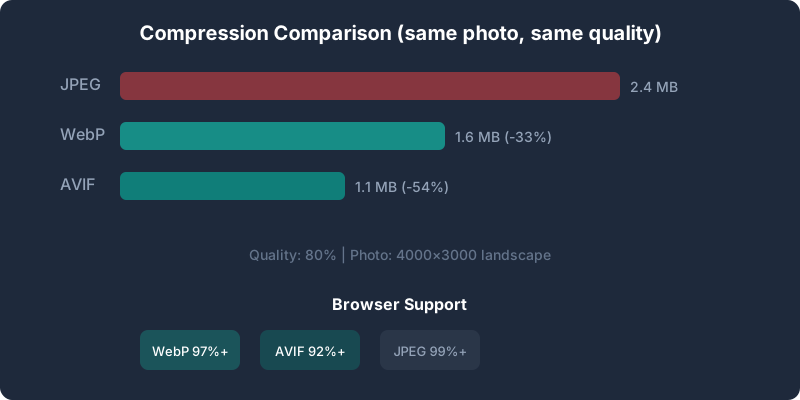
AVIF typically achieves 20-30% smaller file sizes than WebP at equivalent visual quality, thanks to the AV1 codec. However, WebP still outperforms JPEG by 25-35%.
| Format | Avg. Savings vs JPEG | Encoding Speed |
| WebP | 25-35% | Fast |
| AVIF | 40-50% | Slower |
In real-world testing with a 4000×3000 landscape photo at quality 80:
The savings compound across a page. A product listing with 20 images could drop from 48 MB (JPEG) to 22 MB (AVIF) — a 54% reduction in total image weight.
Encoding Speed Matters
Not all compression is equal when you need real-time conversion:
If you run a high-traffic e-commerce site that generates thumbnails on the fly, WebP's speed advantage is significant. For static hero images or pre-processed galleries, AVIF's superior compression wins.
Browser Support
For the latest compatibility data, see our AVIF Browser Support Guide.
When to Use WebP
When to Use AVIF
The Best Strategy: Serve Both
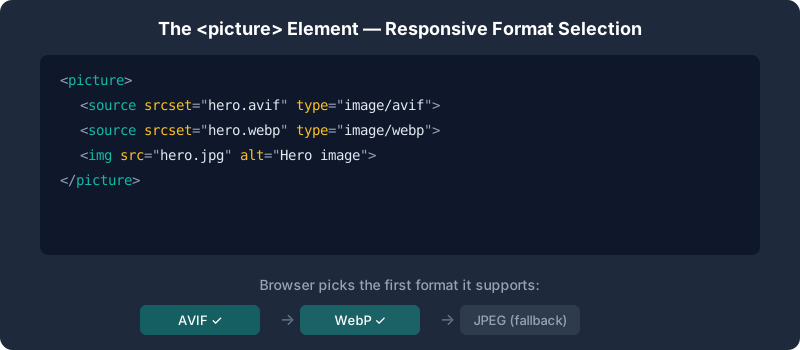
Use the
``html
`
The browser evaluates each in order and picks the first format it supports. If none match, it falls back to the tag. This guarantees every visitor sees an image — and the most efficient one their browser can handle.
Responsive Images with Size Attributes
Combine format selection with responsive sizing for maximum impact:
`html
`
Always include width and height attributes to prevent Cumulative Layout Shift (CLS) — a Core Web Vitals metric that Google uses for ranking.
Common Pitfalls to Avoid
Real-World Case Study: E-Commerce Product Page
We tested this approach on a Shopify store with 150 product pages, each containing 8–12 product images (average 1800×1800px, ~350KB JPEG each).
Before optimization:
After converting to WebP (quality 82) with resizing to 1200×1200:
After switching hero images to AVIF (quality 78):
The key insight: the biggest gains came not just from format conversion, but from resizing images to match their display dimensions. Most product photos were being served at 3–4x their displayed size. Resize first, convert second.
Try It Yourself
Our Bulk Image Converter lets you convert images to both WebP and AVIF directly in your browser — no upload required, completely free. You can also compare quality settings side-by-side to find the optimal balance for your images.
For a complete optimization workflow, check out our guide on How to Compress Images Without Losing Quality.
Ready to optimize your images?
Try BulkPicConv — Free